
Task-capable tools and sources
A task has one handle and one owner even when its progress arrives through a different transport. The agent uses shared controls to inspect and wait; the original tool or service remains responsible for executing and cancelling the work.
Which work becomes a task?
Section titled “Which work becomes a task?”| Kind | Acceptance and progress |
|---|---|
| MCP | A task-capable server accepts work and CLIO returns a handle. Ordinary synchronous calls still return ordinary results. |
| Download | An approved connected-source transfer returns a handle with available byte progress. |
| Indexing | Connecting or refreshing a source starts persisted indexing with enumeration progress. |
| Shell | An explicitly backgrounded command returns a handle and incremental output. Foreground execution remains the default. |
| Script | A run_code script started in the background returns a handle at once. Its row shows elapsed time, tool calls, memory and its last progress. An ordinary script runs within the response. |
| Subagent | Asynchronous spawning returns the child’s assignment handle. |
| Session | Human-started work has an assignment handle before inference. The session remains its stable address across assignments. |
| Question | Asking posts a question and returns a handle immediately. Waiting for its answer is a separate action. |
Cancellation works across task kinds. Messaging, pause/resume and restart apply to authorized agent assignments, including human-started sessions.
MCP calls
Section titled “MCP calls”FastMCP/Docket executes ordinary Shell, Download and Indexing workloads. External MCP servers execute their own work. CLIO records their handles, observations and mail in Core; its conversation engine executes root and child assignments. Short controls and questions use FastMCP without occupying a background worker. The model receives accepted background handles while the work is running.
CLIO retains the full backend identity, including server, session and task. Reconnecting uses that identity; it does not submit the operation again. A backend that cannot recover its work is reported as interrupted. Input and permission questions remain attributed to their task.
Downloads and indexing
Section titled “Downloads and indexing”Use the normal source connection and
download or link choices. Background execution
does not broaden the selected paths, provider permissions or requested revision.
Signing in, selecting data and authorizing access remain separate steps.
The agent-facing connected_data_download tool uses the approved transfer path.
Equivalent active indexing requests are deduplicated. A refresh builds its new manifest separately so it cannot replace a complete earlier manifest with a partial one. Download cancellation settles its staging cleanup before reporting the cancelled terminal result.
Indexing a source does not mean the source has been downloaded. A download task does not make every file in a remote account available to the agent.
Background shell commands
Section titled “Background shell commands”Ask the agent to use shell_bash with background=true for work that should
continue independently. Omitting that argument keeps foreground execution.
Both modes use the same native FastMCP workload. Stop ends a background command’s caller and waiter while the command continues. For a foreground command, Stop requests cancellation and waits for the owned process tree to settle. Use Cancel task to stop accepted background work.
Run the existing conversion script in the background. Keep its handle, inspectits new output periodically, and review the README while it runs. If it fails,report the actual error rather than starting it again automatically.This example does not invoke a command. The command still follows the workspace’s
confinement, confirmation and output limits. timeout_s is the command’s explicit
execution limit; it is separate from the timeout on wait_tasks.
On service shutdown, CLIO stops admission, cancels or withdraws owned local work, and waits for physical settlement. Pending settlement remains visible. If a process is force-closed before settlement, its outcome remains uncertain. It does not reattach to a process using only a PID or automatically replay the command.
Background scripts
Section titled “Background scripts”A background script is Python the agent writes that calls its own tools, for example to watch a job and report when it ends. It runs in its own process until it finishes or its task is cancelled. It keeps running after the response, and after the child agent that started it ends. Its messages wake the conversation that owns it, at most once every 30 seconds, and its questions wait in that conversation until answered. A clean shutdown settles it as cancelled with its output so far; CLIO does not start it again. See Scripts and background work.
Recovering uncertain work
Section titled “Recovering uncertain work”Losing a submission reply does not prove that the operation was rejected. Keep the returned handle, inspect its status and check actual output or filesystem effects before deciding whether to retry. Native worker redelivery after failure can repeat or overlap effects. CLIO records observed attempts and reports uncertainty. An explicit retry creates a new linked handle; it does not rewrite the old outcome.
Inspect work whose connection was lost
Section titled “Inspect work whose connection was lost”The footer shows task needs inspection while CLIO cannot confirm an outcome. Select it to open Observability → Evidence, then expand the task for its assignment and available output. Technical details keeps the handle and backend status out of the compact row until you need them.
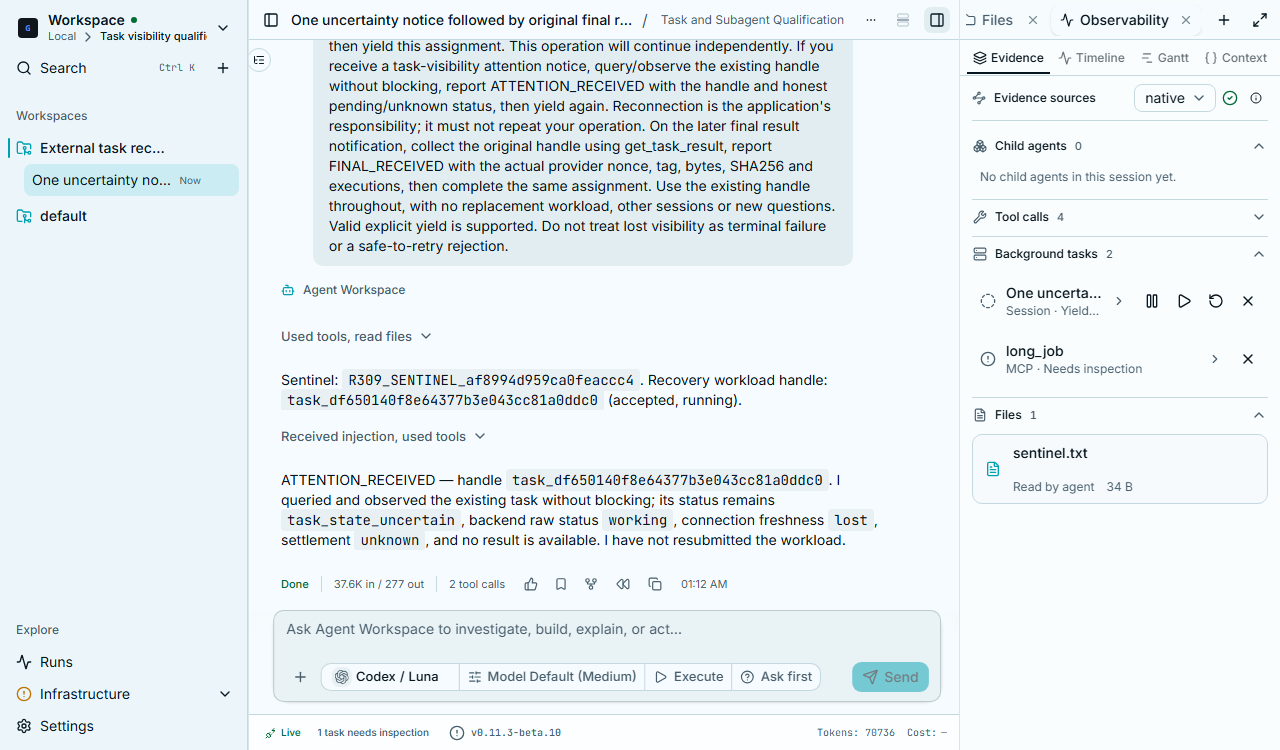
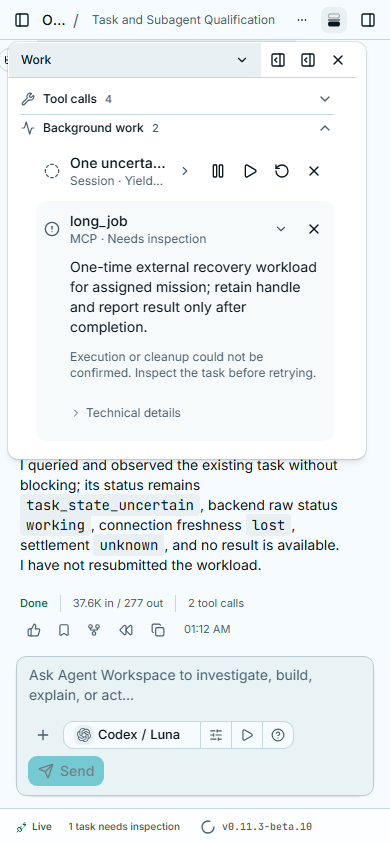
When the original service can confirm a final result, CLIO delivers that result and clears the inspection notice. Losing visibility alone does not justify replaying an operation.
Large responses on the Codex subscription API
The direct HTTP route receives server-sent events (SSE). CLIO’s lm15.sse_limit
setting, also exposed as CLIO_LM15_SSE_LIMIT, sets a positive byte ceiling for
each line. The default is 1,048,576 bytes. This is a response-size setting, not an
inference or task timeout. Long-running work does not exceed it merely by taking
more time.
Current actual-model measurement observed 87 lines above 65,536 bytes, with a maximum of 82,331 bytes, passing through the production parser at the default 1 MiB ceiling. This verifies that specific transport boundary, not the entire Tasks qualification matrix.
Combining kinds
Section titled “Combining kinds”A parent can review files while a download and a child analysis run, observe both, then wait for all required outcomes. Start with the handles returned by accepted work. Observe and wait explains partial failures, expired waits and stored result collection.
A remote scheduler submission has its own boundary: finishing a command that submits a Slurm job does not prove that the scheduled job has completed. Tracking that job’s lifecycle requires an adapter that observes the actual scheduler outcome.