
Download a copy or link to originals
Choose this when you add files, after selecting the source and folder. The choice applies to the copy or link you create; signing in does not choose an editing mode for you.
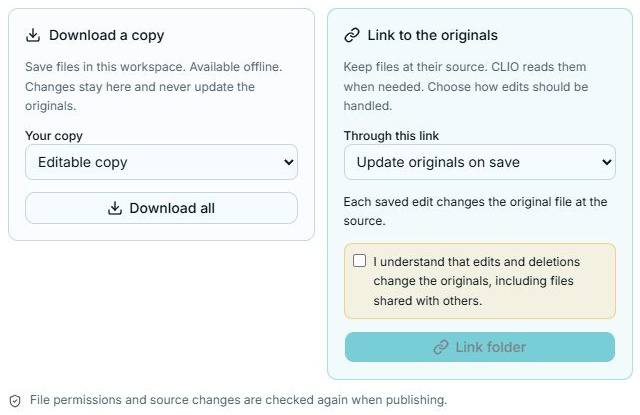
Download a copy
Section titled “Download a copy”A download is a separate copy in your workspace. It is available offline and does not send later edits back to the source.
| Mode | What you can do |
|---|---|
| Editable copy | Work on the downloaded files in CLIO. Changes stay in this workspace. |
| Read only | Inspect and reference the downloaded files. Writes are rejected. |
Choose Download all for the current folder, or download an individual file from the list. When the download completes, the attachment appears in your draft.
Link to the originals
Section titled “Link to the originals”A link keeps the connection to the source. CLIO reads the files as needed. Choose what should happen to edits:
| Mode | Where edits go | Example |
|---|---|---|
| Read only | Writes are rejected at the file access boundary. | Refer to a shared dataset without changing it. |
| Edit locally, publish later | Edits stay in CLIO until you explicitly review and publish them. | Prepare repository changes, then publish selected edits together. |
| Update originals on save | Saved edits and deletions propagate to the source. | Work directly in your writable SSH folder. |
Only supported modes are offered. A public read-only source cannot become writable because you selected it in CLIO. Source permissions and changes are checked again when publishing.
Review before publishing
Section titled “Review before publishing”With Edit locally, publish later, review changed files and publish the edits you intend to send back. For a writable GitHub branch, selected edits can be published together as one commit. This is an explicit action; saving a local edit does not publish it.
With Update originals on save, there is no later publish step. Choose it only when you intend changes to reach the originals. Downloading never enables this behavior.
Refresh, reuse, or unlink
Section titled “Refresh, reuse, or unlink”Return to the saved source to browse its files, refresh the linked listing, or reference a whole folder in another message. Unlink folder removes the workspace link. It does not delete the original folder. Read Manage sources before removing a setup you still need.