
Add, reload, and remove blueprints
Start in Settings → Marketplaces & blueprints → Marketplaces. The overview explains the Installed list and workspace filters.
Add a marketplace
Section titled “Add a marketplace”- Choose Add marketplace.
- Select Git repository or Folder on CLIO. Enter the repository URL or choose a folder on the machine running CLIO. Git repositories use access configured on that machine.
- Give it a recognizable name. Under Available in, choose all workspaces or one workspace. Advanced settings include the repository revision when applicable.
- Choose Add marketplace. CLIO reads the collection and prepares its blueprints. Check the resulting status and installed count.
- If you chose one workspace, select it in Workspace view to see its marketplace and installed blueprints.
The example uses a small Research examples folder created for the walkthrough. Adding a collection can install its blueprints; this is more than saving a bookmark. Review a source you trust. Installation validation may start declared tool services to check that required tools are available.
Reload deliberately
Section titled “Reload deliberately”Reload on a marketplace fetches or rereads the collection and prepares updated installed copies. Reload installed copy in a blueprint’s actions menu targets that blueprint. These actions can change installed versions; they are not merely page refreshes.
Expand Browse blueprints to compare available and installed versions. If a blueprint is not installed, its row offers Install. Removing an installed copy leaves it available to install again from its marketplace.
When a reload needs attention
Section titled “When a reload needs attention”Read the short explanation first. Open Reload details for the operation record and technical diagnostics if you need to investigate or report the failure.
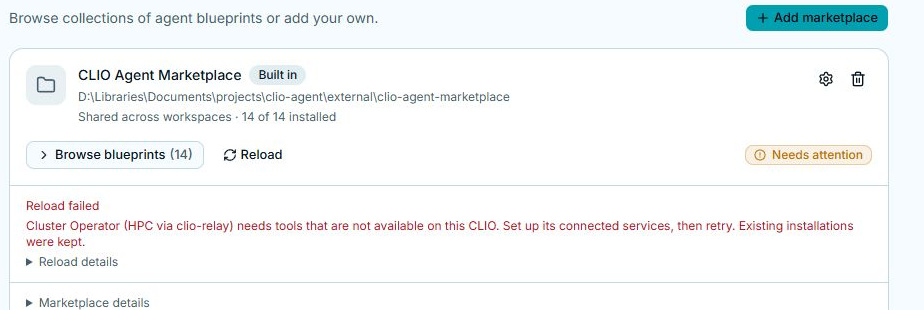
Set up the named services or correct the collection, then retry. A failed staged reload preserves the prior installed copies. Check Installed after a successful retry to confirm the version you will use.
Remove a copy or a collection
Section titled “Remove a copy or a collection”On Installed, the blueprint’s actions menu offers Remove. On Marketplaces, use the collection’s remove control and read its confirmation. Removing a marketplace and removing one installed blueprint have different scope; check the affected items before confirming.
After installation, select the blueprint for a new conversation. A marketplace does not replace the provider/model account needed to run that agent. See Connect a model.