
Your first analysis: check a small dataset
Start with a question you can check by hand. This example uses fictional bike station counts, a small table with measurements at several times. It requires CLIO and a model that can use tools; it does not require a specialist agent.
Download bike-stations.csv. The file is a teaching example, not evidence about real stations or individual journeys.
Add the data and ask one question
Section titled “Add the data and ask one question”-
Open CLIO and connect a model. Create a conversation in a project folder where you want to keep this example’s outputs. Use the general-purpose agent already available in your installation.
-
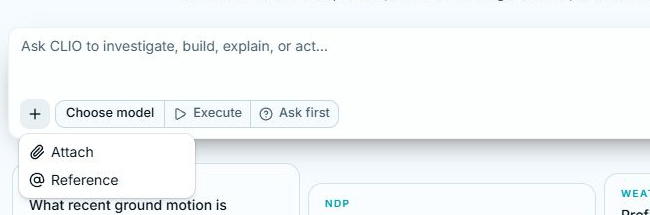
Choose + → Attach beside the message box and select the downloaded CSV. Check that the attachment is present before sending the request. The attachment guide explains copies and locations.
-
Send this request:
Inspect the attached CSV and explain what one row and each measurement columnrepresent. Then tell me when Fernhill is first recorded empty. Show the sourcevalues behind your answer and identify anything the file cannot establish.Keep the original file unchanged. These counts are fictional. -
Read any clarification before answering it. If CLIO asks to run a command or create a file, inspect that action and choose the permission you intend. Allow once applies to that action. You can deny it and ask for another approach.
-
Read the result and open the supporting file or table. A useful answer names the station, gives the observed time and shows which values support it.
Check the answer
Section titled “Check the answer”In this sample, Fernhill has four bikes at 8:00 and zero at 8:15. Therefore 8:15 is the first recorded empty observation. The table does not tell you the exact moment the count reached zero between observations or where the bikes went.
If your answer omits the source values or overstates what happened, send a follow-up in the same conversation:
Show the Fernhill values at 8:00 and 8:15. Distinguish the first recorded emptyobservation from the exact time it became empty. Link the file or table you used.Open Data to find the inputs and outputs, or expand a tool row to inspect the recorded result. Check answers and sources explains those views. If CLIO cannot read the file, inspect its error and the selected attachment before retrying. You do not need a particular Python script or a fixed output layout.
Continue with your own work
Section titled “Continue with your own work”Try another small dataset and ask CLIO to inspect its structure before making assumptions. State the question, units you know, missing-information concerns and the output you want. Ask it to explain unresolved fields rather than repair your original measurements or silently discard inconvenient records.
You can then build a dashboard or create a report and presentation.