
Marketplaces and blueprints
A marketplace is a collection of agent blueprints. A blueprint describes an agent’s instructions, experts, tools, and defaults. An installed copy is the version available to start a conversation on this CLIO.
Open Settings → Marketplaces & blueprints. Use Installed to find an agent you can use; use Marketplaces to browse and manage the collections it comes from.
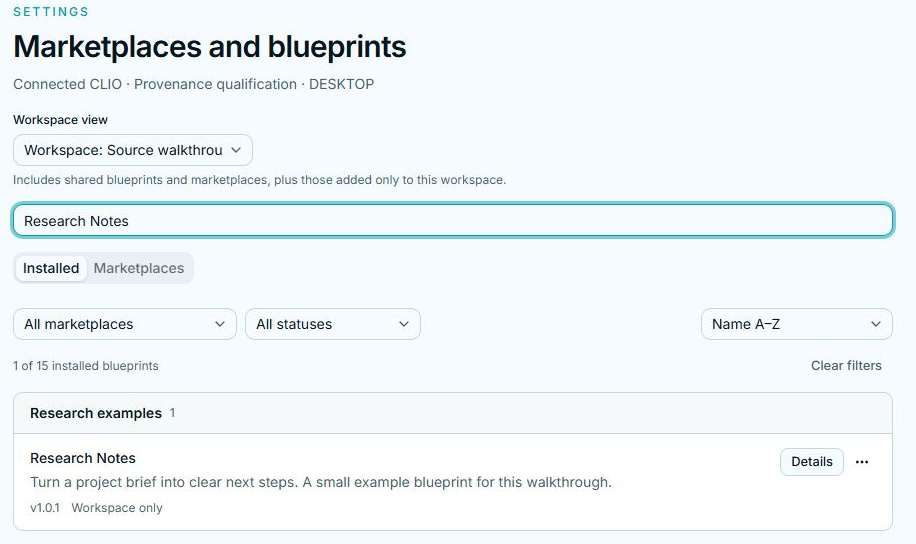
Find an installed blueprint
Section titled “Find an installed blueprint”Search by name or description. Use the status filter to focus on entries needing attention, and sort by name or recent installation. Blueprints are grouped by their marketplace. A marketplace filter appears when there is more than one group.
Click the blueprint name or Details. The three tabs answer different questions:
| Tab | What to look for |
|---|---|
| Overview | What the agent does, its status, version, workspace access, connected services, and requirements. |
| Instructions | The blueprint’s readable instructions and documentation. |
| Installation | Where the installed copy came from and the recorded installation details. |
Installing a blueprint does not start a conversation. Choose it when creating a session; it then supplies the agent configuration for that session. See Sessions and modes.
Workspace view is about access
Section titled “Workspace view is about access”Shared across workspaces shows shared installations and marketplaces. Workspace: … includes those shared entries plus entries added only to that workspace. A workspace named “default” is simply a workspace, not another default marketplace.
The All marketplaces filter, when present, answers a different question: which collection the installed blueprints came from. It does not change their workspace access.
Available is not the same as installed
Section titled “Available is not the same as installed”Expand Browse blueprints on a marketplace. Available is the version found in the collection; Installed is the copy currently installed. Seeing a newer available version does not mean it has already replaced your copy.
Continue with Add, reload, and remove for installation and update workflows. To create your own collection, see Writing agent blueprints.