
Manage and reuse sources
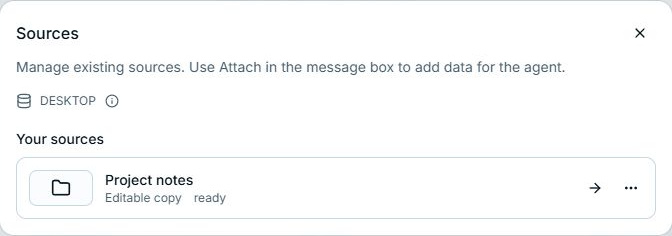
Open Sources in the Files panel to manage saved connections. To add one to a message, use Attach → Your sources in the composer.
Reuse existing material
Section titled “Reuse existing material”Expand Your sources in Attach and open the source. Reference the whole folder, browse into a subfolder and reference that, or select one file. An existing download or link can be reused without creating a second copy.
To point to an existing workspace file, type @ and its name directly in your message.
Choose the action by its effect
Section titled “Choose the action by its effect”| Action | What happens | What remains |
|---|---|---|
| Remove an existing @ reference from a draft | The message stops referring to that item. | The existing file, result, or conversation. |
| Remove a newly prepared, unsent attachment | CLIO cleans up the copy or link created for that draft, including an unneeded source-named folder. | Original source files and content already retained or used by sent messages. |
| Unlink folder | The workspace stops using that linked mapping. | The original folder and the saved source connection. |
| Disconnect | Access through that source connection stops. | Original files. |
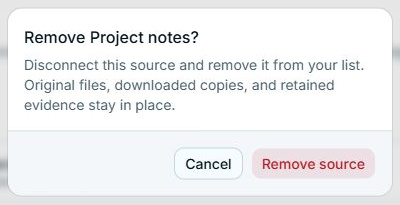
| Remove source | The source is disconnected and removed from the saved list. | Original files, downloaded copies, and retained evidence. |
| Sign out under a provider | The saved account sign-in is removed. Other sources using it may need sign-in again. | Sources and their original files. |
Accounts are reusable across workspaces on the same CLIO; source setups are workspace-specific. Connect sources explains that distinction.